Follow the steps below to enable the cookies needed for personalization of timeanddate.com
Netscape 7.x
- Click on the Edit-menu in Netscape
- Click on the Preferences... item in the menu - a new window opens
- Expand the Privacy & Security selection in the left part of the window. (See first image below)
- Click on the Cookies selection.
- Under Cookie Acceptance Policy - either check the Enable all cookies checkbox or Allow cookies based on policy settings.
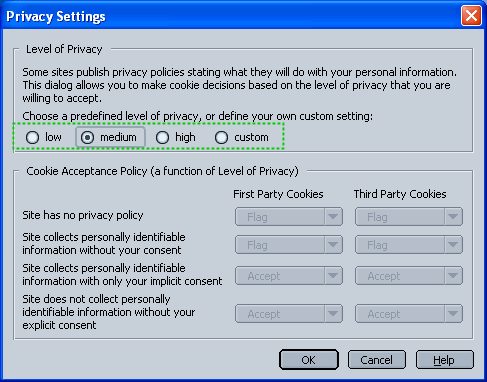
- If Allow cookies based on policy settings is selected, click on View and ensure that the level is at low or medium (See second image below).
- Save changes by clicking Ok

Netscape 6.x
- Click on the Edit-menu in Netscape
- Click on the Preferences... item in the menu - a new window opens
- Expand the Advanced selection in the left part of the window.
- Click on the Cookies selection.
- Check the Enable all cookies setting
- Save changes by clicking Ok
Netscape 4.x
First of all - please consider upgrading to a newer browser - Netscape 4 have significant shortcomings.- Click on the Edit-menu in Netscape
- Click on the Preferences... item in the menu - a new window opens
- Click on the Advanced selection in the left part of the window.
- Click on the Cookies selection.
- In the lower part of the screen, Accept all cookies should be checked
- Save changes by clicking Ok